Custom dashboard development for Saudi operations
Cicada Solutions builds operational and KPI dashboards that management can trust, because the work starts with what each number means and where it comes from, not with the charts.

- 01One definition per number
- 02Data pulled, not pasted
- 03Client-owned code and IP
- 04Alerts, not just charts
A dashboard is only as good as the argument it ends.
Most management teams do not lack charts. They lack numbers that everyone agrees on, delivered early enough to act, without someone spending two days assembling them.

Two reports, two answers
Finance and operations both report revenue, and the figures differ because each counts returns, discounts or dates differently. The meeting is spent reconciling, not deciding.
Month end is copy and paste
Exports from the POS, the accounting system and HR are combined in a spreadsheet by one person, and the report is only as reliable as that afternoon.
The dashboard nobody opens
A BI project produced impressive charts once, but nobody trusted the figures, the data stopped refreshing and the team went back to spreadsheets.
Problems are seen after they cost money
The monthly report shows the overspend, the stockout or the idle branch weeks after anyone could have done something about it.
Follow one number from its source to the decision it supports.
A useful dashboard is a chain of trust: a clear definition, a reliable source, a view built for the person who acts, and a path back to the records behind every figure. These screens come from systems Cicada has built.
Agree what every metric means and who owns it
Each metric gets a written definition, a source, a refresh schedule and an owner, so revenue, utilization or cost mean the same thing in every meeting.
Pull data automatically and check it on arrival
Data is collected from the POS, ERP, HR system and approved spreadsheets on a schedule, with checks that flag missing days, duplicates and broken feeds.
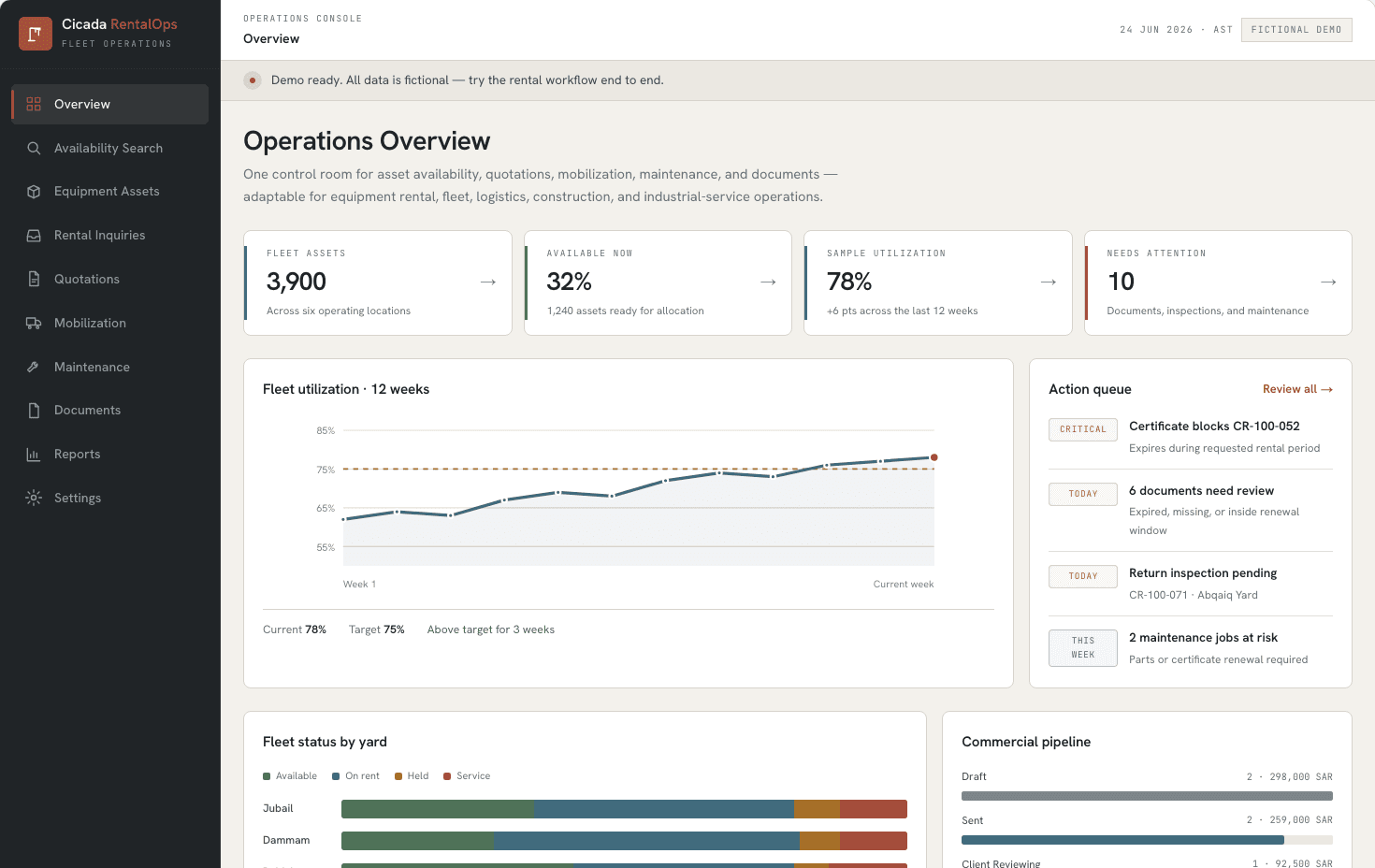
Give operations a view of today, not last month
An operations view shows what needs attention now: the action queue, status by location and the measures that matter this week, against their targets.
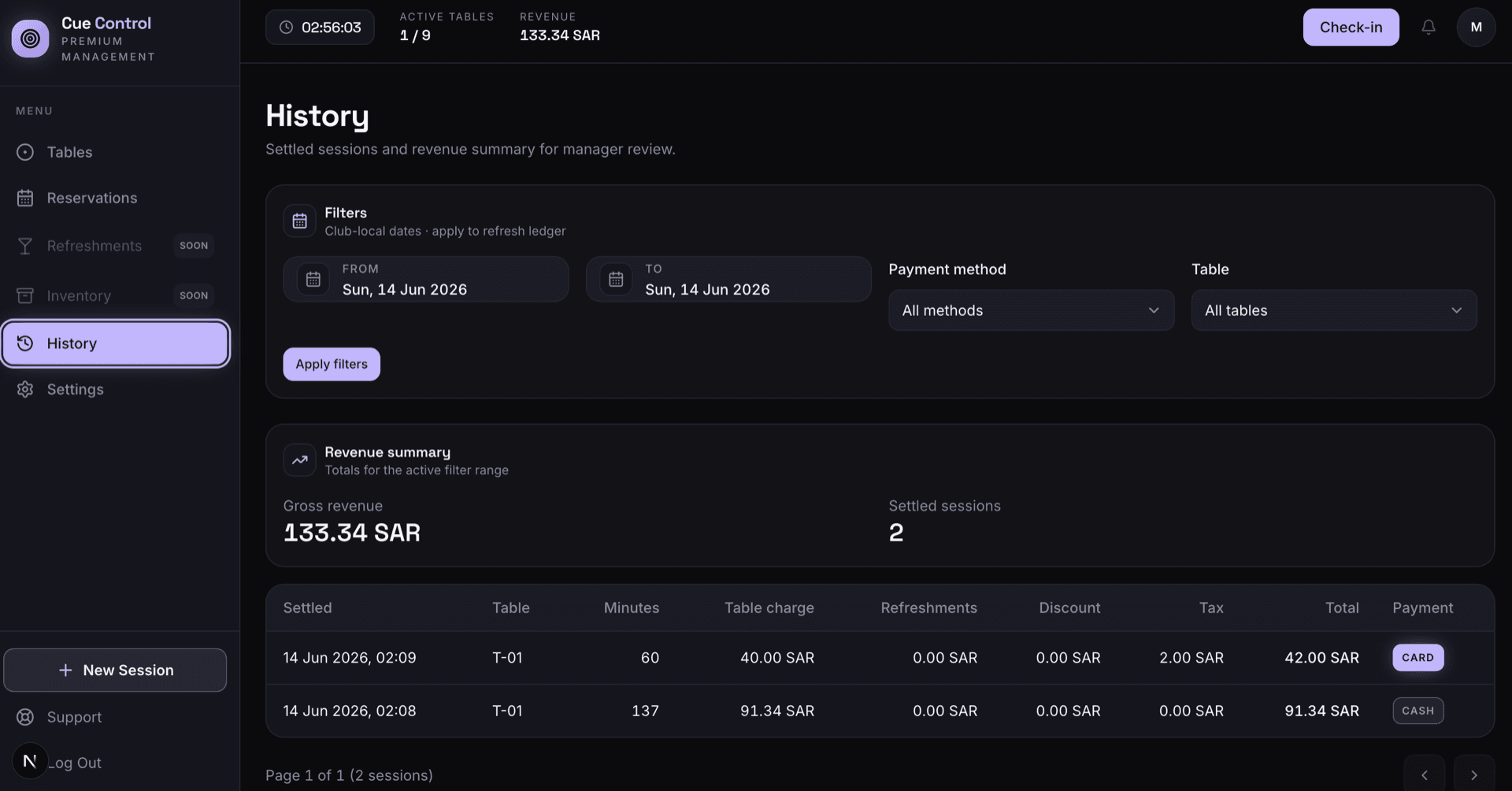
Let every total open the records behind it
Totals drill down to the transactions that produced them, so a surprising figure can be explained in a minute instead of questioned for a week.
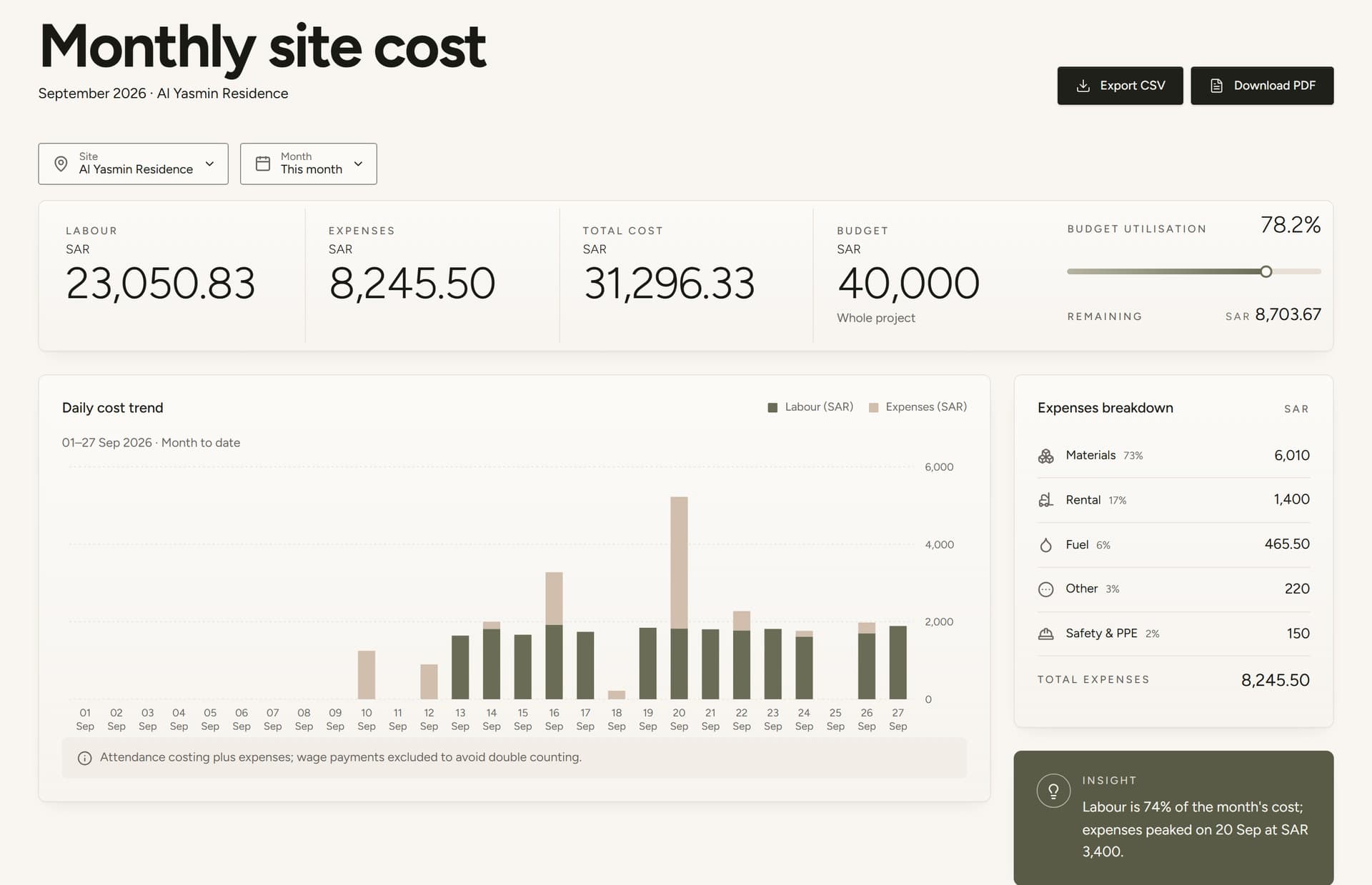
Produce the monthly view without assembling it
Cost, budget use and trends by site, branch or project come from the same governed data, ready for the management meeting.
Tell the owner when a number crosses a line
Thresholds on the measures that matter send an alert to the person who can act, the day the problem starts.
Screens from RentalOps (fictional demo data), Cue Control (sample data) and SiteLedger (as published in its case study).
What a dashboard needs underneath the charts.
- Metric dictionary and owners
- Pipelines from POS, ERP, HR and files
- Data quality checks
- Role-based and branch-level views
- Drill-down to source records
- Threshold alerts
- Scheduled PDF and Excel reports
- Branch, site and project comparisons
- Arabic and English labels
- Mobile management view
Different decisions need different dashboard shapes.
Executive view
A small set of measures reviewed weekly, each against its target and trend, with branches or business units side by side.
- Weekly KPI review
- Target and trend per measure
- Unit and branch comparison
Operations control room
Today's queue, exceptions and live status for the people who run the floor, the yard or the site.
- Action queue
- Status by location
- Exceptions with owners
Finance and cost view
Budget against actual, cost allocation and margin by project, branch or customer, built on the same data as operations.
- Budget against actual
- Cost allocation rules
- Margin by project or branch
Connect the dashboard to every system that holds part of the truth.
Integration planning starts with the source of record for each metric, and what the dashboard should show when a feed is late or wrong.
The custom system
One record of truth. Each connection has an owner and a failure path.
- 01
POS and sales
Sales, tenders, discounts and returns by branch, item and hour.
- 02
ERP and accounting
Revenue, cost, stock value, receivables and budgets from the ledger.
- 03
HR and payroll
Headcount, labour cost and attendance by site or department.
- 04
Customer and pipeline data
Leads, deals and service cases from your customer system. If that system is the gap, see our custom CRM development.
- 05
Spreadsheets and files
Approved files loaded on a schedule with validation, so manual inputs stop breaking the report.
- 06
BI tools
Where you already use Power BI or Looker Studio, the cleaned data can feed them instead of a new front end.
Evidence from dashboards inside systems we have built.
Each of these systems carries a management view built on its own operational records, which is why the figures can be trusted and explained.
Workforce and site costs
SiteLedger
Operations overview and monthly site cost reports for a Riyadh general contractor.
Open proof02Fleet control room
RentalOps
Fleet KPIs, utilization against target, an action queue and yard status in one view.
Open proof03Venue revenue
Cue Control
Revenue summaries and a session ledger that explains every figure.
Open proofJudge the dashboard by decisions made earlier.
Dashboard value shows up as fewer arguments about numbers, fewer hours spent preparing them and problems spotted while they are small. Each should be measured against a baseline taken before launch.
Trust
Measure whether the numbers are accepted.
- Metrics with agreed definitions
- Meetings spent reconciling figures
- Corrections after publishing
Effort
Measure the manual work removed.
- Hours preparing reports
- Manual exports per month
- Spreadsheets retired
Speed
Measure how soon problems become visible.
- Time from event to visibility
- Alerts acted on the same day
- Issues found by the dashboard first
Adoption
Measure whether managers actually use it.
- Weekly active managers
- Decisions citing the dashboard
- Requests for new views
During discovery, Cicada agrees the baseline, target, measurement owner and review window with you. Results depend on data quality, adoption and operating decisions; they are not guaranteed.
A custom dashboard is not always the right answer.
If your data already lives in one clean system, a BI tool on top of it is often enough, and we will say so. Custom development earns its place when data is spread across systems that disagree, when the dashboard must drive actions, or when it belongs inside an operational system.
| Decision | BI tool on exports | Custom dashboard |
|---|---|---|
| Data preparation | Someone cleans and loads the exports. | Pipelines collect, check and model the data automatically. |
| Actions | Shows the number; action happens elsewhere. | Alerts, owners and drill-downs turn the number into a task. |
| Access and roles | Licence per viewer; row-level rules can be complex. | Branch, site and role views built into the same login staff already use. |
| Ownership | Priced per user while you subscribe. | The client owns the code and IP for the custom build by default. |
Answer the expensive questions before the build.
Each page resolves one question management teams ask before investing in dashboards and data.
Custom ERP development
When the real fix is one shared record, not another report.
Open pageCustom software or off-the-shelf ERP
A guide for Saudi SMEs choosing between a suite and a custom system.
Open pageRentalOps interactive demo
Explore a fleet control room with fictional data.
Open pageCustom CRM development
Pipeline, follow-up and service views built on one customer record.
Open pageSaudization and iqama tracking
A live compliance dashboard by profession and establishment.
Open pageWhere AI belongs in operations software
A practical test for when AI helps a dashboard and when it does not.
Open pageStart with the decisions, not the data. Commit in useful stages.
- 01
Decision interviews
Ask each manager which decisions they make every week and which numbers they need to make them.
- 02
Metric dictionary
Write definitions, sources, owners and refresh schedules, and settle disagreements before any chart exists.
- 03
Connections and checks
Build the data pipelines with quality checks, and prove the numbers match the source systems.
- 04
First dashboard for one team
Release one view for one team, watch how it is used, and fix what they question.
- 05
Alerts, roles and rollout
Add thresholds, branch and role views and scheduled reports, then extend to further teams.
Data and access
Branch managers see their branch, finance sees cost, and sensitive figures such as salaries stay with the roles that need them.
Hosting and Saudi context
Cloud or self-hosted deployment, with data location and PDPL considered for any personal data in the model.
Ownership and support
The client owns the custom code and IP by default, with documented definitions and a path for new measures.
Built in Riyadh for management teams across the Kingdom.
Saudi reporting has its own details: a Sunday to Thursday week, labels in Arabic and English, and Ramadan moving through the Gregorian calendar, which distorts year-on-year comparisons unless periods are aligned. Cicada is based in Riyadh and builds dashboards for businesses across Saudi Arabia.
Practical answers before the first conversation.
01Do you build in Power BI or as custom software?
Either, depending on what fits. Where a BI tool is already licensed and adopted, we can build the data model and pipelines behind it. Where the dashboard must drive actions or live inside an operational system, we build it as custom software.
02Which data sources can you connect?
Most systems with an API, a database or a reliable export: POS, accounting, ERP, HR, booking and customer systems, plus approved spreadsheets loaded with validation.
03Is the data live or daily?
It depends on the decision. Operational views can refresh every few minutes; financial views often refresh daily after the books update. Each metric's refresh schedule is agreed and shown on screen.
04Can it show Arabic and English?
Yes. Labels, reports and exports can be bilingual, with right-to-left layouts for Arabic and Hijri or Gregorian dates where needed.
05Will it work on phones?
Yes. Management views are designed to be read on a phone, with alerts that open straight to the figure that triggered them.
06How long does a first dashboard take?
Most first releases go live in four to eight weeks after discovery, usually one view for one team on connected, checked data.
07Do we own the code and intellectual property?
Yes. Cicada Solutions' default position is that the client owns the code and IP for the custom build, subject to the final agreement and any clearly identified third-party services.
Show us which number your team argues about most.
Tell us which reports you prepare today, where the data comes from and which decisions are waiting on better numbers. We will respond with a practical starting point.
- Reports prepared today and by whom
- Systems and files the data comes from
- Decisions that need faster or better numbers
- BI tools you already use, if any