Fleet and car rental software for Riyadh operators
Cicada Solutions builds rental and fleet systems that know where every vehicle and machine is, what it is committed to, and what is stopping it from earning, from the first inquiry to the return inspection.

- 01Cars, equipment or both
- 02Availability you can trust
- 03Client-owned code and IP
- 04Built around your yards
A unit earns nothing while nobody knows it is free.
Most rental operators already have the data. It is spread across a booking sheet, the yard manager's memory, a maintenance notebook and the accounting system, and none of them agree on Thursday's availability.

Availability lives in someone's head
The yard knows which unit is free next week. The counter does not, so it calls, waits, and occasionally promises the same vehicle to two customers.
Documents expire while the unit is on rent
Registration, insurance, periodic inspection and operator certificates lapse quietly, and the first person to notice is often a customer or an inspector on site.
Returns are checked on paper
Damage, fuel and odometer readings go onto a sheet that never reaches billing, so charges are missed and disputes have no photos to settle them.
Utilization is a monthly guess
Owners cannot see which units earn, which sit idle, and which spend more days in the workshop than on rent, so fleet decisions run on instinct.
Follow one unit from inquiry to inspection.
A useful rental system is the route a booking travels, with each step checking what the last one promised. These screens come from RentalOps, an equipment rental system Cicada built.
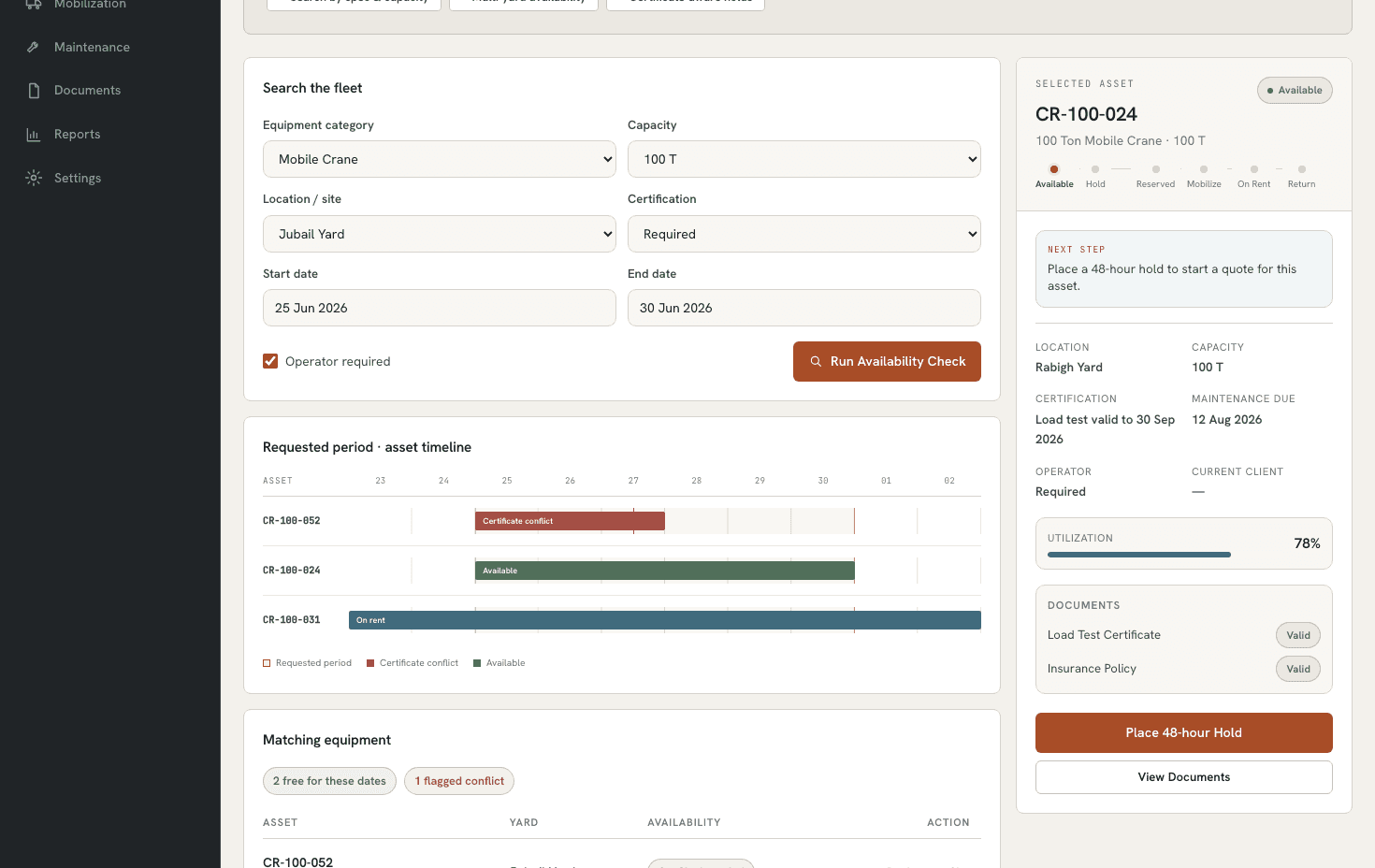
Search by date, site and spec, not by memory
The counter searches availability for the requested dates and location. Units blocked by maintenance or an expiring certificate are flagged, and suitable alternatives appear before anyone makes a promise.
Quotation holds that expire on their own
A quote reserves the unit for an agreed window. If the customer does not confirm, the hold releases automatically instead of blocking the fleet for weeks.
Mobilise with the paperwork attached
Delivery, driver or operator, contract and handover checklist travel together, so the yard sends the right unit with the right documents.
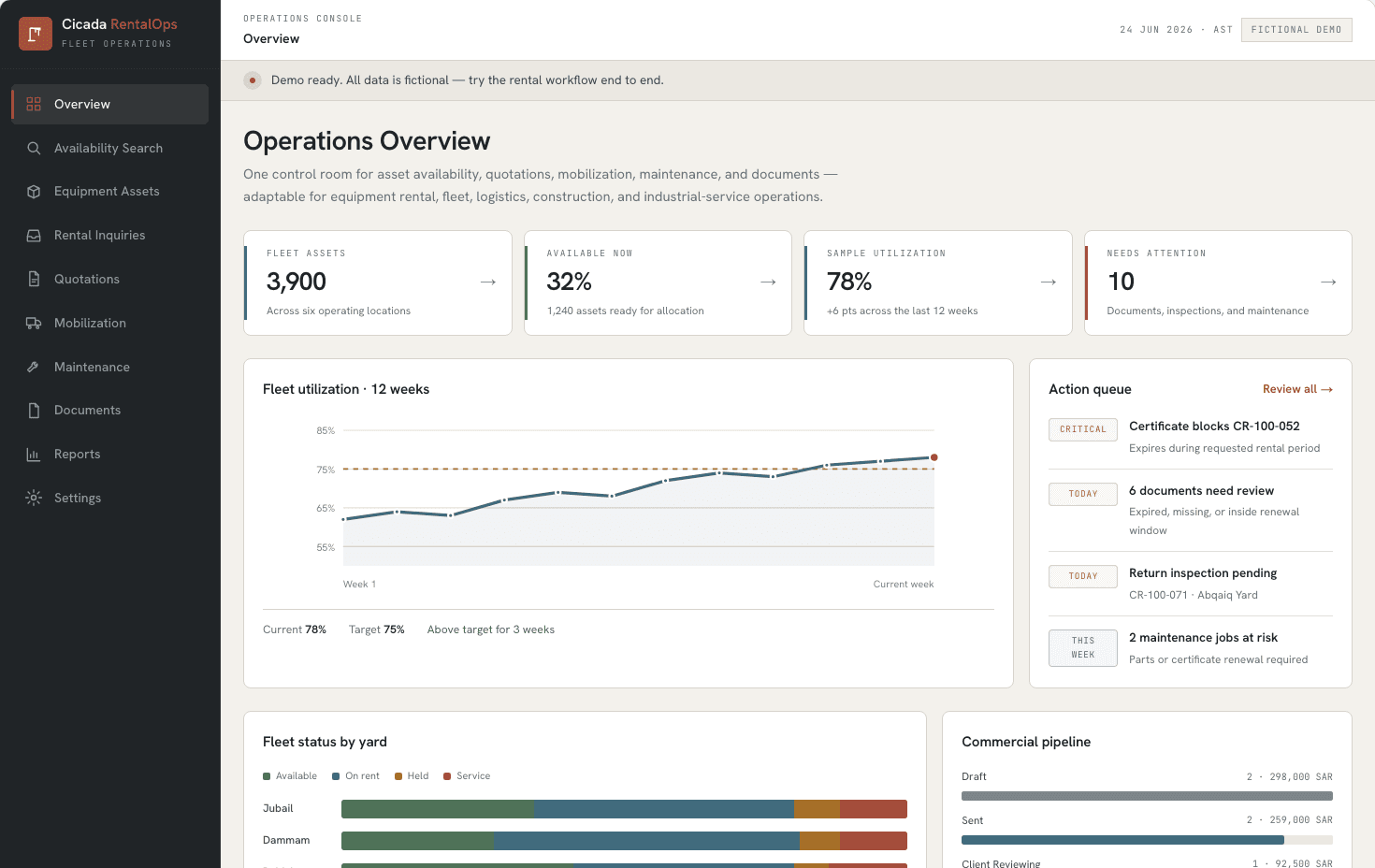
One control room for the whole fleet
Managers see what is on rent, what is due back, which yards are short and what needs attention today, with utilization tracked against target.
Inspect on a phone, bill from the same record
Return checks capture photos, fuel, odometer or hour meter and damage against the handover record, and any charge flows straight to the invoice.
Service and documents block allocation automatically
Service intervals by kilometres, engine hours or date, and document expiry dates, stop a unit from being booked before it is safe and legal to send out.
RentalOps screens are shown with fictional demo data. Your system is designed around your own yards, unit types and contracts.
The records and controls the yard and counter actually use.
- Date-aware availability search
- Quotation holds with expiry
- Multi-yard and branch fleet
- Dispatch and delivery scheduling
- Photo-based return inspection
- Fuel, odometer and hour-meter capture
- Maintenance by km, hours or date
- Document and certificate expiry blocks
- Deposits and contract records
- Utilization and downtime reports
Different rental businesses need different system shapes.
Car rental branches
Daily and monthly rentals across branches, walk-in and corporate customers, deposits, mileage allowances and the follow-up that comes after the car is back.
- Corporate account pricing
- Deposit and pre-authorisation records
- Traffic violation follow-up
Equipment rental yards
Long hires to contractors, machines that need certified operators, mobilisation to remote sites and billing by the day or by engine hours.
- Mobilisation and demobilisation
- Operator and certificate checks
- Hour-meter billing
Corporate and service fleets
Vehicles your own teams use for deliveries or field work, assigned to drivers, maintained on schedule and costed per unit.
- Driver assignment history
- Fuel and service cost per unit
- Renewals before they lapse
Connect the fleet record to the systems around it.
Integration planning starts with ownership: which system creates the booking, which one may change it, and what the team should see when a connection fails.
The custom system
One record of truth. Each connection has an owner and a failure path.
- 01
Telematics and GPS trackers
Odometer, location and engine hours from your tracking provider, through its API or scheduled exports.
- 02
Rental contract records
Where your licence requires contracts on TGA's Tajeer platform, each rental keeps its contract reference. Direct access depends on what the platform grants your establishment.
- 03
Accounting and ERP
Invoices, deposits and receivables posted once, from the rental record, instead of being keyed again.
- 04
ZATCA e-invoicing
Compliant invoices issued through an integrated e-invoicing solution, with clearance and reporting status visible per rental.
- 05
Payments
Card, mada and deposit pre-authorisations through your payment gateway, matched to the contract.
- 06
Customer and corporate portal
Bookings, active rentals and statements for corporate clients who would otherwise call for them.
Evidence from a rental system we have built.
RentalOps is the same discipline a fleet system needs: availability that respects documents and maintenance, holds that expire, and a manager view that shows what needs attention.
Rental lifecycle
RentalOps
Inquiry, availability, quotation hold, mobilisation, on-rent status, return, inspection and maintenance in one workflow.
Open proof02Try it yourself
RentalOps demo
Search availability, place a hold and move a unit through the yard with fictional data.
Open proof03Sector brief
Equipment rental software
How equipment rental operators in Saudi Arabia connect yards, contracts, certificates and reporting.
Open proofJudge the system by units earning, not screens shipped.
Fleet value should be measured against a baseline taken before launch. The first signals are usually fewer conflicts, faster confirmations, complete return records and a clear view of idle units.
Availability and conflicts
Measure whether the counter can promise a unit with confidence.
- Double bookings per month
- Time to confirm availability
- Units blocked by stale holds
Utilization
Measure whether each unit earns its place in the fleet.
- Time-based utilization per unit
- Idle days by yard
- Revenue per unit and class
Returns and damage
Measure whether every return is inspected and charged correctly.
- Returns inspected with photos
- Damage charges recovered
- Disputes raised by customers
Maintenance and documents
Measure whether units go out safe, serviced and legal.
- Units on rent with expired documents
- Overdue services
- Workshop downtime hours
During discovery, Cicada agrees the baseline, target, measurement owner and review window with you. Results depend on adoption, data quality and operating decisions; they are not guaranteed.
Custom rental software is not always the right answer.
A rental subscription product is often the better choice for a standard car rental counter. Custom development earns its place when your fleet mixes vehicles and equipment, or when availability depends on more than a calendar.
| Decision | Rental software subscription | Custom rental system |
|---|---|---|
| Rental model | Built around standard daily, weekly and monthly rates. | Fits mixed models: cars and machines, operators, mobilisation and hour-based billing. |
| Availability logic | A calendar per vehicle. | One search that checks dates, site, spec, documents, certificates and maintenance. |
| Connections | Limited to the vendor's integration list. | Follows the trackers, accounting and contract records you already rely on. |
| Ownership | Priced per vehicle or user, for as long as you subscribe. | The client owns the code and IP for the custom build by default. |
Answer the expensive questions before the build.
Each page below resolves one question fleet and rental operators ask before they commit.
Equipment rental software
The sector view: yards, contracts, certificates and reporting for Saudi rental businesses.
Open pageRentalOps interactive demo
Run a rental from search to return with fictional data.
Open pageZATCA Phase 2 integration
Connect rental invoicing to Fatoora without rebuilding billing.
Open pageCustom dashboard development
Utilization, downtime and revenue per unit on one trusted view.
Open pageCustom ERP development
When rentals need to share one record with purchasing, stock and finance.
Open pageNCA cybersecurity controls
What the new national controls mean for operational systems like yours.
Open pageStart at the counter and the yard. Commit in useful stages.
- 01
Counter and yard walk-through
Follow real units from inquiry to return and record every place a booking can break.
- 02
Fleet and document register
Clean the unit list: classes, specs, yards, documents, service intervals and current status.
- 03
Availability first
Release search, holds and bookings first, because conflicts are where money is lost soonest.
- 04
Returns, maintenance, billing
Add inspections, workshop scheduling and the accounting connection once the core is trusted.
- 05
Trackers and reporting
Connect telematics and build utilization reporting on data the team already believes.
Data and access
Counter, yard, workshop and finance each see what their role needs. Customer identity data is masked and access is logged.
Hosting and Saudi context
Cloud or self-hosted deployment is assessed against PDPL, data location and the sensitivity of customer records.
Ownership and support
The client owns the custom code and IP by default, with a documented path for support and future changes.
Built in Riyadh for rental operators across the Kingdom.
Saudi rental operations run on long distances between yards, site work in industrial cities and documents that are checked on the road. Cicada is based in Riyadh and works with operators in Riyadh, Jeddah, Dammam, Jubail and across the Eastern Province.
Practical answers before the first conversation.
01Can one system handle both cars and heavy equipment?
Yes. Vehicles and machines share the same availability, contract and maintenance records, while each class keeps its own rules, such as mileage allowances for cars and operator certificates or hour-meter billing for equipment.
02Can it connect to our GPS trackers?
Usually. Most tracking providers offer an API or scheduled exports for odometer, location and engine hours. Discovery confirms what your provider supports before the integration is scoped.
03Does it work with Tajeer rental contracts?
The system can store the Tajeer contract reference with each rental and prepare the data your team submits. Direct platform integration depends on the access TGA grants your establishment, which is confirmed during discovery.
04How are return inspections and damage recorded?
On a phone or tablet: a checklist, photos, fuel and odometer or hour-meter readings, compared with the handover record. Any agreed charge goes straight to the invoice.
05Can corporate customers see their own rentals?
Yes, through an optional portal that shows active rentals, due dates, documents and statements, so account managers spend less time answering status calls.
06How long does a first release take?
Most first releases go live in four to eight weeks after discovery. The first release usually covers availability, holds and bookings; returns, maintenance and integrations follow in stages.
07Do we own the code and intellectual property?
Yes. Cicada Solutions' default position is that the client owns the code and IP for the custom build, subject to the final agreement and any clearly identified third-party services.
Show us where a unit gets lost between yard and invoice.
Tell us how many units and yards you run, what you track today, and where bookings, returns or documents go wrong. We will respond with a practical starting point.
- Fleet size and unit classes
- Yards, branches and service areas
- Current booking and inspection tools
- Trackers, accounting or contract platforms to connect