Custom inventory management systems for Saudi operators
Cicada Solutions builds inventory systems that tell the truth about stock across every branch, warehouse and channel, so sales can promise, purchasing can reorder and finance can value stock without a weekend count.

- 01Every branch and warehouse
- 02Batches and expiry tracked
- 03Client-owned code and IP
- 04Matches your POS and ERP
When the system says twelve and the shelf says four, nobody trusts either.
Stock problems rarely start at the count. They start with a receipt nobody checked, a transfer nobody confirmed and a sale recorded in one place but not another.

The record and the shelf disagree
Sales promise stock that is not there, or reorder items already sitting in the back, because the number on screen drifted weeks ago.
Transfers disappear in transit
Stock leaves the warehouse but is never received at the branch, so it exists in both places on paper and in neither on the shelf.
Expiry dates live on paper
Food, cosmetics and other dated products are tracked by eye, so older batches expire behind newer ones and write-offs arrive as a surprise.
Reordering runs on instinct
Purchasing orders what it remembers selling, so fast movers run out while slow movers fill the warehouse and tie up cash.
Follow one item from the delivery bay to the reorder.
A useful inventory system records every movement where it happens, so the number on screen is the number on the shelf. These screens come from systems Cicada has built.
Receive against the order, with batch and expiry
Deliveries are scanned against the purchase order, batches and expiry dates are captured, and short or damaged items are flagged before anyone signs.
Put stock where the system says it is
Items are put away to a bin or shelf location, so pickers and counters go straight to the right place.
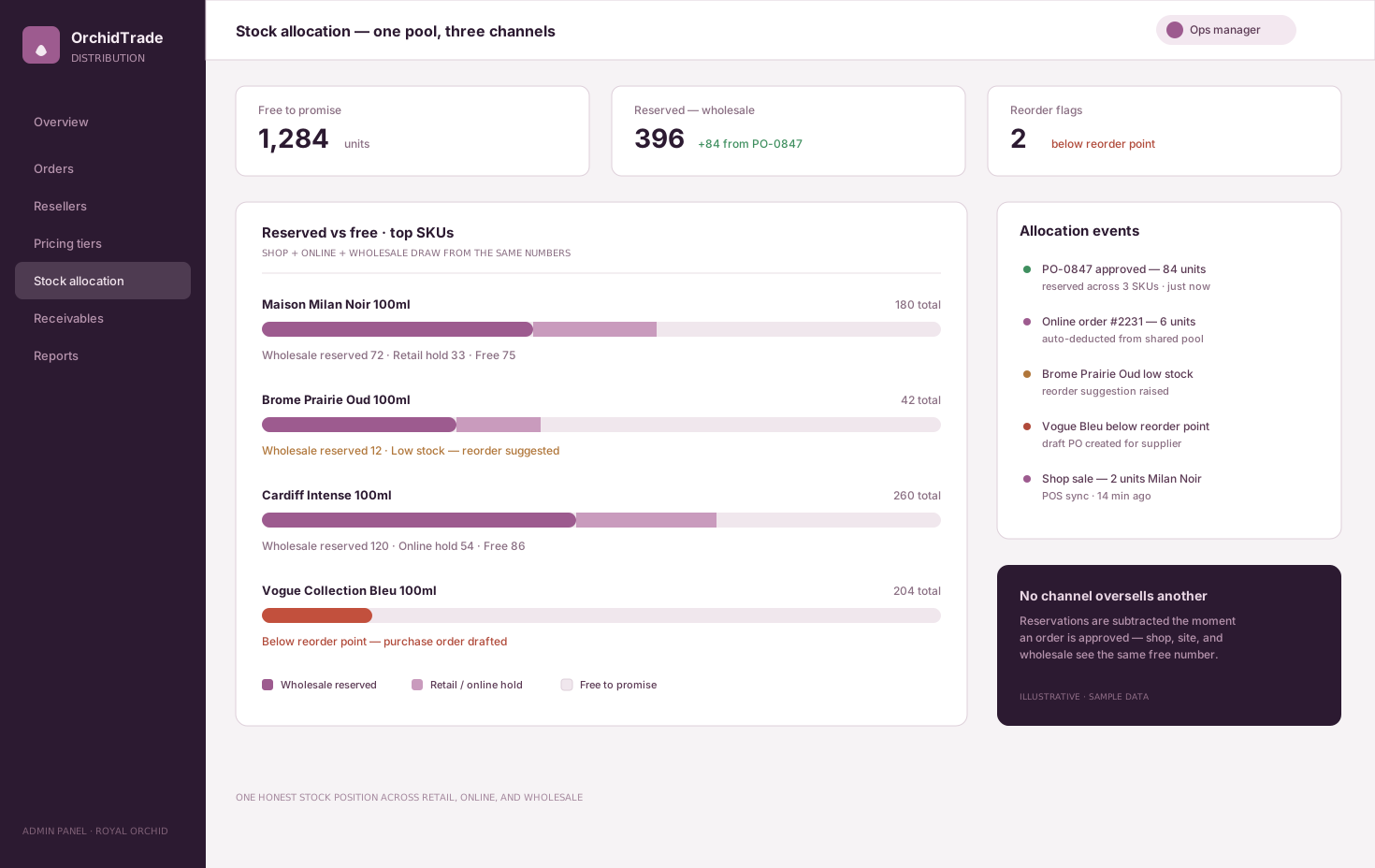
Reserve stock for each channel and order
Confirmed orders reserve stock, and each channel sees what is free to sell rather than what is merely on the shelf.
Move stock between locations with nothing lost in transit
Transfers are requested, picked, sent and received, with in-transit stock visible until the receiving branch confirms it.
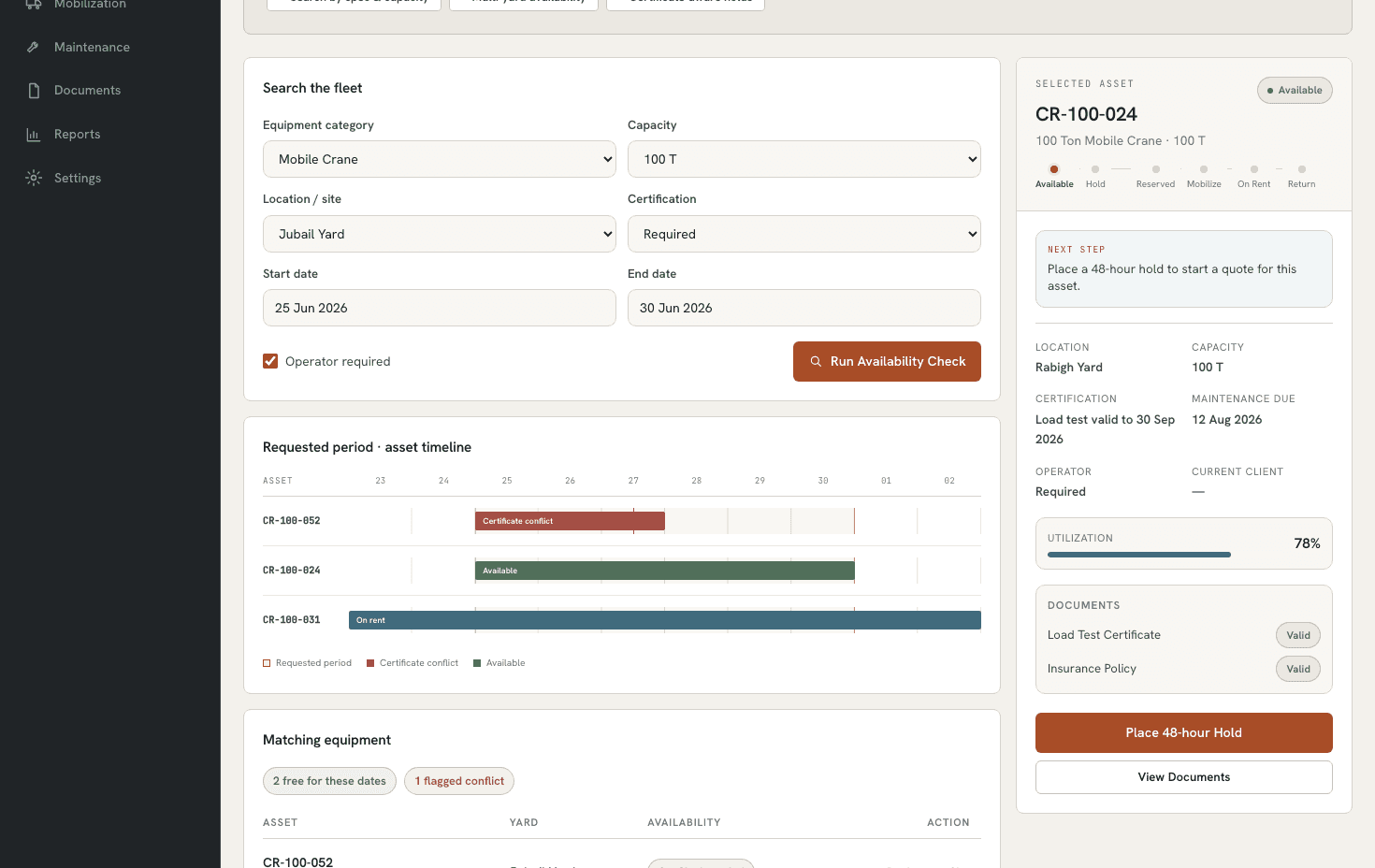
Search stock across every location before saying no
Staff search availability across branches, yards or warehouses and see what is blocked and what alternatives exist, before turning a customer away.
Count by zone and reorder from real demand
Cycle counts cover a few locations each day with variances approved, and reorder suggestions come from minimum levels and recent sales.
Screens from OrchidTrade (illustrative schematic with sample data) and RentalOps (fictional demo data).
The records and controls the warehouse and branches actually use.
- Multi-branch and warehouse stock
- Barcode receiving and picking
- Batches, serials and expiry dates
- Bin and shelf locations
- Transfers with in-transit status
- Reservations by channel
- Cycle counts and variance approval
- Minimum levels and reorder suggestions
- Stock valuation
- Mobile scanning
Different stock operations need different system shapes.
Multi-branch retail
Stock spread across branches and a central warehouse, with transfers, returns and sales from every location feeding one picture.
- Branch and warehouse stock
- Transfers and returns
- Branch replenishment
Distributors and wholesalers
Large item ranges, customer reservations, batches and expiry, picking for routes and stock allocated across channels.
- Batch and expiry control
- Reservations and allocation
- Pick lists by route
Operational stores
Spare parts for a fleet, supplies for hotels or site stores for contractors, issued to jobs and costed where they are used.
- Issues to jobs or assets
- Site and workshop stores
- Cost per job
Connect stock to every system that moves it.
Integration planning starts with one rule: every sale, receipt and transfer updates stock once, in the place it happened.
The custom system
One record of truth. Each connection has an owner and a failure path.
- 01
POS
Branch sales and returns update stock as they happen, and the POS sees what each branch can sell.
- 02
Online store
Online orders reserve stock from the same pool as the branches, so the website does not oversell.
- 03
ERP and accounting
Receipts, issues and valuation post to the ledger, so finance values stock from the same records.
- 04
Suppliers
Purchase orders, delivery notes and price lists from suppliers, matched at receiving.
- 05
Scanners and label printers
Handheld scanners and phones for receiving, picking and counting, plus shelf and carton labels.
- 06
Delivery and couriers
Shipments to customers or branches handed to your fleet or courier, with status returned to the order.
Evidence from systems we have built.
These systems apply the discipline inventory needs: one stock pool shared by every channel, availability that respects what is blocked, and movements that are recorded where they happen.
Stock allocation
OrchidTrade
Reserved and free stock across retail, online and wholesale, with low-stock signals and approvals.
Open proof02Multi-yard availability
RentalOps
Availability across yards that accounts for maintenance, certificates and holds.
Open proof03Sector brief
Retail POS software
How Saudi retailers connect checkout, stock and replenishment across branches.
Open proofJudge the system by the number on the shelf.
Inventory value shows up as records you can promise from, transfers that land, fewer write-offs and less cash tied up in slow stock. Each should be measured against a baseline taken before launch.
Accuracy
Measure whether records match the shelf.
- Record accuracy at count
- Value of count variances
- Adjustments without a reason
Availability
Measure whether customers get what they ask for.
- Stockouts of fast movers
- Orders sold without stock
- Lost sales from no availability
Movement
Measure whether stock arrives where it was sent.
- Transfers received on time
- Age of in-transit stock
- Receiving discrepancies
Working capital
Measure how much cash sits in the wrong stock.
- Slow-moving stock value
- Expired stock written off
- Days of stock on hand
During discovery, Cicada agrees the baseline, target, measurement owner and review window with you. Results depend on adoption, data quality and operating decisions; they are not guaranteed.
A custom inventory system is not always the right answer.
The stock module inside a POS or accounting product is enough for one location and simple items. Custom development earns its place with several branches, channels and warehouses, batches and expiry, or stock that must match a POS and ERP you already run.
| Decision | Built-in stock module | Custom inventory system |
|---|---|---|
| Locations | One store or a few with basic transfers. | Branches, warehouses, yards and site stores with tracked transfers. |
| Item control | Quantities, sometimes basic variants. | Batches, serials, expiry, bins and reservations by channel. |
| Connections | Tied to the product it sits inside. | Shared by your POS, online store, ERP and suppliers. |
| Ownership | Part of a subscription you do not control. | The client owns the code and IP for the custom build by default. |
Answer the expensive questions before the build.
Each page resolves one question operators ask before changing how they control stock.
Custom ERP development
When stock needs to share one record with orders, purchasing and finance.
Open pagePOS and invoicing software
Checkout that updates branch stock as it sells.
Open pageRestaurant POS software
Recipe-based stock deduction for kitchens and branches.
Open pagePOS requirements guide
What Saudi retail and restaurant POS must cover, including stock.
Open pageCustom dashboard development
Stock value, turns and availability by branch on one screen.
Open pageRestaurant ERP for multi-branch groups
When the stock is ingredients, recipes and central kitchen batches.
Open pageStart on the warehouse floor. Commit in useful stages.
- 01
Stock walk and sample count
Walk the warehouse and a branch, count a sample of locations and trace where the records went wrong.
- 02
Item master clean-up
Clean items, units, barcodes, Arabic and English names, batches and locations before migration.
- 03
Receiving and transfers first
Release receiving, put-away and transfers, because that is where most stock goes missing.
- 04
Counts, reorders, integrations
Add cycle counts, reorder suggestions and the POS, online store and ERP connections.
- 05
Valuation and reporting
Add valuation, ageing and slow-mover reporting once movements are trusted.
Data and access
Adjustments need a reason and approval, cost prices are limited to the roles that need them, and every movement is logged.
Offline and hosting
Scanning keeps working in warehouse dead spots and syncs afterwards, on cloud or self-hosted infrastructure.
Ownership and support
The client owns the custom code and IP by default, with a documented path for new locations and channels.
Built in Riyadh for stock spread across the Kingdom.
Saudi stock often sits far apart, with branches and warehouses in Riyadh, Jeddah and the Eastern Province, items named in Arabic and English, and suppliers invoicing with VAT on every receipt. Cicada is based in Riyadh and builds inventory systems for operators across Saudi Arabia.
Practical answers before the first conversation.
01Can we keep the barcodes we already use?
Yes. Existing supplier and in-house barcodes are imported with the item master, and new labels can be printed for items or locations that do not have one.
02Does it handle expiry dates and first-expiry-first-out?
Yes. Batches and expiry dates are captured at receiving, picking suggests the batch that expires first, and alerts flag stock approaching its date.
03Can it manage several warehouses and branches?
Yes. Every location keeps its own stock, transfers between them are tracked through transit, and management sees the combined picture.
04Will it connect to our POS?
Usually. Sales and returns can update stock from your existing POS through its API or exports, or from a POS we build alongside the inventory system.
05Does scanning work without internet?
Yes, when designed for it. Handhelds keep recording in warehouse dead spots and sync when they reconnect.
06Can you migrate our current stock data?
Yes. Item data is cleaned and mapped, opening balances are verified with a count, and the switch is planned so trading does not stop.
07Do we own the code and intellectual property?
Yes. Cicada Solutions' default position is that the client owns the code and IP for the custom build, subject to the final agreement and any clearly identified third-party services.
Show us where your stock numbers stop matching the shelf.
Tell us how many locations and items you manage, how stock moves between them and which systems record sales and purchases today. We will respond with a practical starting point.
- Branches, warehouses and item count
- Batches, expiry or serial numbers
- Current POS, ERP and spreadsheets
- Where counts or transfers go wrong today