Custom POS and invoicing software for Saudi businesses
Cicada Solutions builds point-of-sale and invoicing systems for Saudi retailers, showrooms and multi-branch businesses whose checkout, pricing, returns or company invoicing do not fit an off-the-shelf till.
- 01Retail, showroom and B2B counters
- 02One price list, every branch
- 03Client-owned code and IP
- 04Compliant invoicing built in
A till that only rings up sales leaves the real work for later.
The checkout is where price, stock, payment and tax meet. When the POS treats it as a simple sale, branches fix the rest by hand at the end of every day.

Prices differ by branch
Promotions are set in one place and missed in another, so the same item rings up at two prices and cashiers override by habit.
Returns break stock and the books
An item bought in one branch and returned to another is refunded without a credit note, and the stock never goes back where it belongs.
Company invoices live outside the POS
Sales to businesses are typed into a template, then chased for payment. Under ZATCA's Phase 2 those standard invoices need clearance before the buyer receives them.
End of day takes an hour per branch
Cash counts, card settlements and closing reports are reconciled by hand and sent to head office, where someone combines them again.
Follow one sale from the scanner to the closing report.
A useful POS is a sequence of small checks: the right price, the right customer, the right tender, the right invoice. Each one prevents a correction later.
Scan with branch prices and live promotions
Barcodes, variants and weighed items resolve to the branch price list, with promotions applied by rule rather than by the cashier's memory.
Attach the customer, or the company's VAT number
Loyalty customers earn as they buy, and company buyers are identified with their VAT number so the right invoice type is issued.
Sell on account with a live credit check
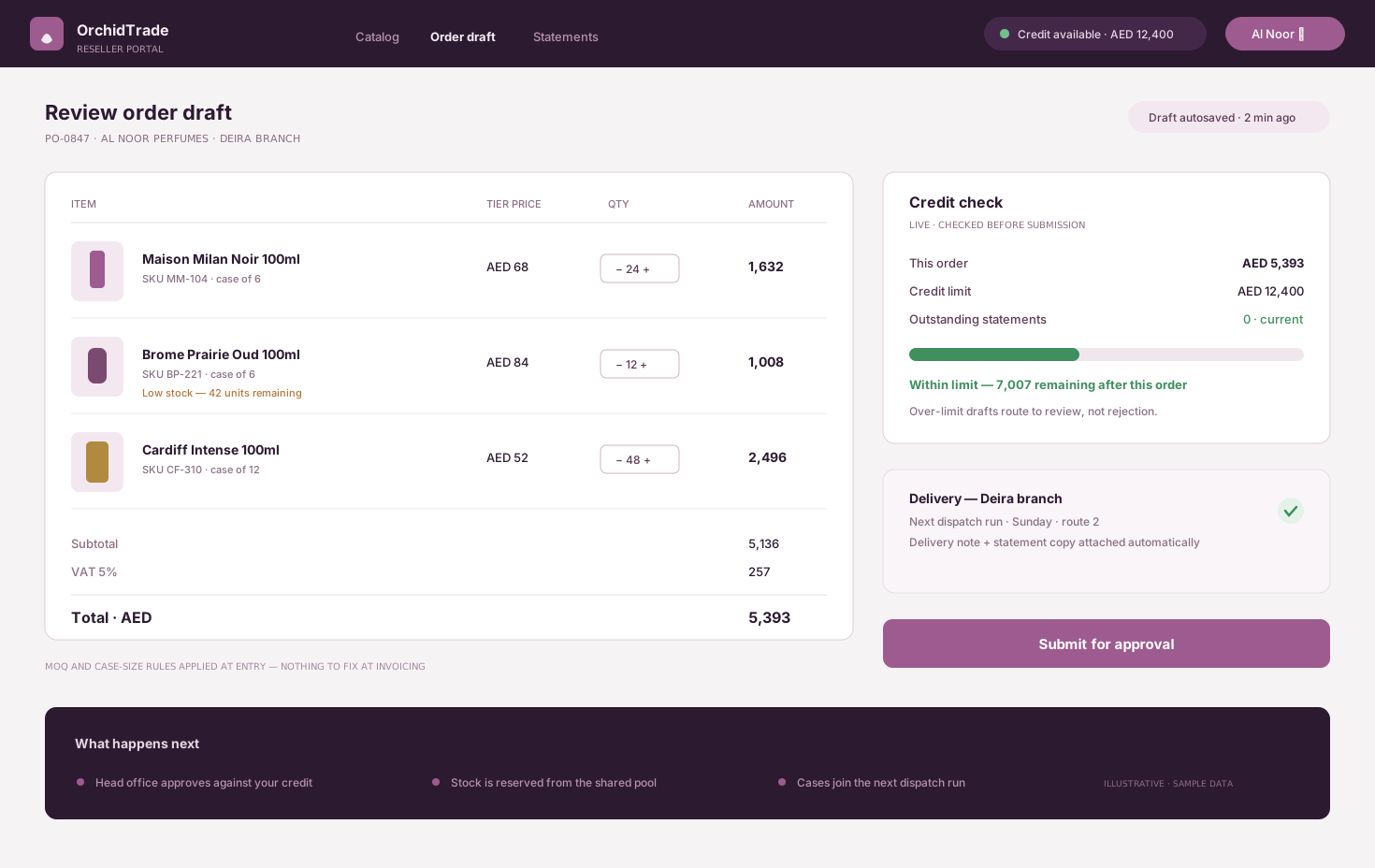
For trade customers, the order shows the account's terms and remaining credit before it is confirmed, so the counter never extends credit by accident.
Split tenders and issue the correct invoice
mada, card, cash or a pay-later provider in any combination, then a simplified invoice for consumers or a standard invoice sent for clearance for businesses.
Refund to the original tender, restock the right branch
Returns look up the original sale from any branch, issue a credit note, refund to the original method and put stock back where it belongs.
Close each till against what the system expects
Expected and counted cash, card settlements and the day's invoices are compared per till, and the closing summary posts to accounting.
The account sale screen comes from OrchidTrade, a B2B ordering system Cicada built, shown with illustrative data.
The records and controls the counter and head office actually use.
- Barcode and variant checkout
- Branch price lists and promotions
- Loyalty and customer accounts
- Account sales with credit limits
- Split tender: mada, card, cash, pay later
- Simplified and standard tax invoices
- Credit notes and cross-branch returns
- Till float and closing reports
- Offline selling with later sync
- Stock deduction per branch
Different counters need different system shapes.
Retail stores and fashion shops
Variants by size and colour, seasonal promotions, loyalty and gift cards, with stock and prices shared across branches.
- Size and colour variants
- Promotion rules by branch
- Loyalty and gift cards
Showrooms and trade counters
Quotes that turn into orders, deposits, account sales to companies and scheduled delivery, all on standard tax invoices.
- Quote to order to invoice
- Deposits and balances
- Credit limits per account
Venues and service counters
Tickets, memberships, packages and services billed by session, sold at a counter that also handles retail items.
- Memberships and packages
- Session-based billing
- Mixed services and retail
Connect the checkout to stock, payments and finance.
Integration planning starts with what must work during a sale even when a connection drops, and which system owns each price, item and invoice.
The custom system
One record of truth. Each connection has an owner and a failure path.
- 01
Payment terminals and pay later
mada and card terminals from your acquirer, plus pay-later providers you already use, reconciled per transaction.
- 02
ZATCA e-invoicing
Simplified invoices reported within 24 hours and standard invoices cleared before they reach the buyer, through an integrated compliant solution.
- 03
Inventory and ERP
Sales and returns update stock per branch, and purchasing sees what sold where.
- 04
Accounting
Daily sales, tenders, credit notes and receivables posted once from the POS.
- 05
Online store
The same items, prices and stock for the website and the counter, so online orders do not oversell.
- 06
Customer messages
Digital receipts and loyalty messages by SMS or WhatsApp Business, subject to provider setup and consent.
Evidence from checkout and ordering systems we have built.
These systems apply the same discipline a POS needs: structured items and prices, tenders that reconcile, credit that is checked before it is extended, and a manager view that is current.
POS and kitchen display
RestoRoots
Order flow, modifiers, tenders and a manager dashboard built for fast service.
Open proof02B2B ordering and credit
OrchidTrade
Tier pricing, credit limits, approvals, stock allocation and statements for a distributor.
Open proof03Sector brief
Retail POS software
How Saudi retailers connect checkout, stock, promotions and reporting across branches.
Open proofJudge the POS by what branches stop fixing by hand.
Checkout value shows up as faster queues, prices that match, returns that reconcile and a close that takes minutes. Each should be measured against a baseline taken before launch.
Checkout speed
Measure how quickly a customer is served at peak.
- Average transaction time
- Queue length at peak hours
- Manual price overrides
Pricing accuracy
Measure whether every branch sells at the intended price.
- Price mismatches between branches
- Manual discounts by cashier
- Promotions applied outside their rules
Returns and credit
Measure whether money and stock move back correctly.
- Returns without a linked sale
- Cross-branch refunds reconciled
- Overdue account balances
Close and compliance
Measure how cleanly each day ends.
- Minutes to close a till
- Cash variances per branch
- Invoices rejected or failed
During discovery, Cicada agrees the baseline, target, measurement owner and review window with you. Results depend on adoption, data quality and operating decisions; they are not guaranteed.
A custom POS is not always the right answer.
A good retail POS subscription is often the better choice for a standard shop. Custom development earns its place when pricing, account sales, returns or integrations are where your business differs.
| Decision | Retail POS subscription | Custom POS system |
|---|---|---|
| Pricing and promotions | Standard price lists and discount types. | Branch, customer and trade pricing with promotion rules that match how you sell. |
| Company sales | Often handled in a separate invoicing tool. | Quotes, deposits, credit limits and standard invoices at the same counter. |
| Connections | Limited to the vendor's app list. | Follows your stock, accounting, online store and payment providers. |
| Ownership | Priced per register or branch while you subscribe. | The client owns the code and IP for the custom build by default. |
Answer the expensive questions before the build.
Each page resolves one question retailers and multi-branch operators ask before they change their checkout.
POS requirements for Saudi retail
What a POS must cover for VAT, ZATCA, payments, returns and branches.
Open pageRestaurant POS software
For table service, kitchen display and delivery apps.
Open pageZATCA Phase 2 integration
Connect an existing POS or ERP to Fatoora without replacing it.
Open pageInventory management systems
Branch stock, transfers, receiving and counts that match the POS.
Open pageRetail POS software
The sector view for Saudi retailers and multi-branch stores.
Open pageZATCA Wave 24 deadline
What the integration phase means at the counter, not only in accounting.
Open pageStart at the counter and the back office. Commit in useful stages.
- 01
Counter observation
Watch real sales, returns and closes in a busy branch, and list every manual correction.
- 02
Item and price model
Structure items, variants, price lists, promotions and customer types before designing screens.
- 03
One-branch pilot
Run checkout, payments and invoicing in one branch through a full trading week.
- 04
Returns, accounts, integrations
Add cross-branch returns, account sales and the stock and accounting connections.
- 05
Rollout and reporting
Extend to further branches with central price control and daily group reporting.
Data and access
Cashier, supervisor and manager roles, approvals for overrides and refunds, and a full audit log of price changes.
Resilience and hosting
Selling continues during a network drop and syncs afterwards. Customer data is handled in line with PDPL.
Ownership and support
The client owns the custom code and IP by default, with a documented path for support and future changes.
Built in Riyadh for counters across the Kingdom.
Saudi checkout has its own shape: VAT at 15% on most sales, mada on nearly every card, pay-later options customers expect, and e-invoicing waves that now reach small businesses. Cicada is based in Riyadh and works with retailers and multi-branch operators across Saudi Arabia.
Practical answers before the first conversation.
01Does the POS handle ZATCA Phase 2 invoicing?
Yes, through an integrated compliant e-invoicing solution. Simplified invoices are reported within 24 hours, standard invoices to businesses are sent for clearance, and the POS shows the status of each one.
02Which payment methods can it accept?
mada and card payments through terminals from your acquirer, cash, and pay-later providers you already work with. The terminal connection is confirmed with your bank during discovery.
03Can we sell on account to companies?
Yes. Trade customers can have terms and credit limits, the counter sees the remaining credit before confirming a sale, and statements and receivables flow to accounting.
04Can a customer return an item at a different branch?
Yes. The original sale is found from any branch, a credit note is issued, the refund goes to the original tender and stock returns to the receiving branch.
05Will it keep selling if the internet drops?
Yes, when designed for it. Sales continue locally and sync when the connection returns, inside the 24-hour reporting window for simplified invoices.
06Can it share stock and prices with our online store?
Yes. The POS and the online store can use the same items, prices and stock, so web orders do not sell what a branch already sold.
07Do we own the code and intellectual property?
Yes. Cicada Solutions' default position is that the client owns the code and IP for the custom build, subject to the final agreement and any clearly identified third-party services.
Show us what your branches fix by hand after closing.
Tell us how many branches and registers you run, how you price and invoice today, and which systems must stay connected. We will respond with a practical starting point.
- Branches, registers and item volume
- Current POS and invoicing tools
- Pricing, promotions and account customers
- Payment, stock and accounting systems to connect