Restaurant POS software for Riyadh hospitality teams
Cicada Solutions builds restaurant POS and kitchen display systems around the way a Riyadh floor actually runs: tables and seats, modifiers and courses, delivery app orders, and a shift close that does not need a spreadsheet.

- 01Built for the rush
- 02Floor, kitchen and manager in one flow
- 03Client-owned code and IP
- 04Pilot in one branch first
The rush is where a restaurant system shows what it is.
Most restaurant systems look fine at four in the afternoon. The cost appears at nine at night, when tickets, tablets and tenders arrive faster than the software was designed to handle.
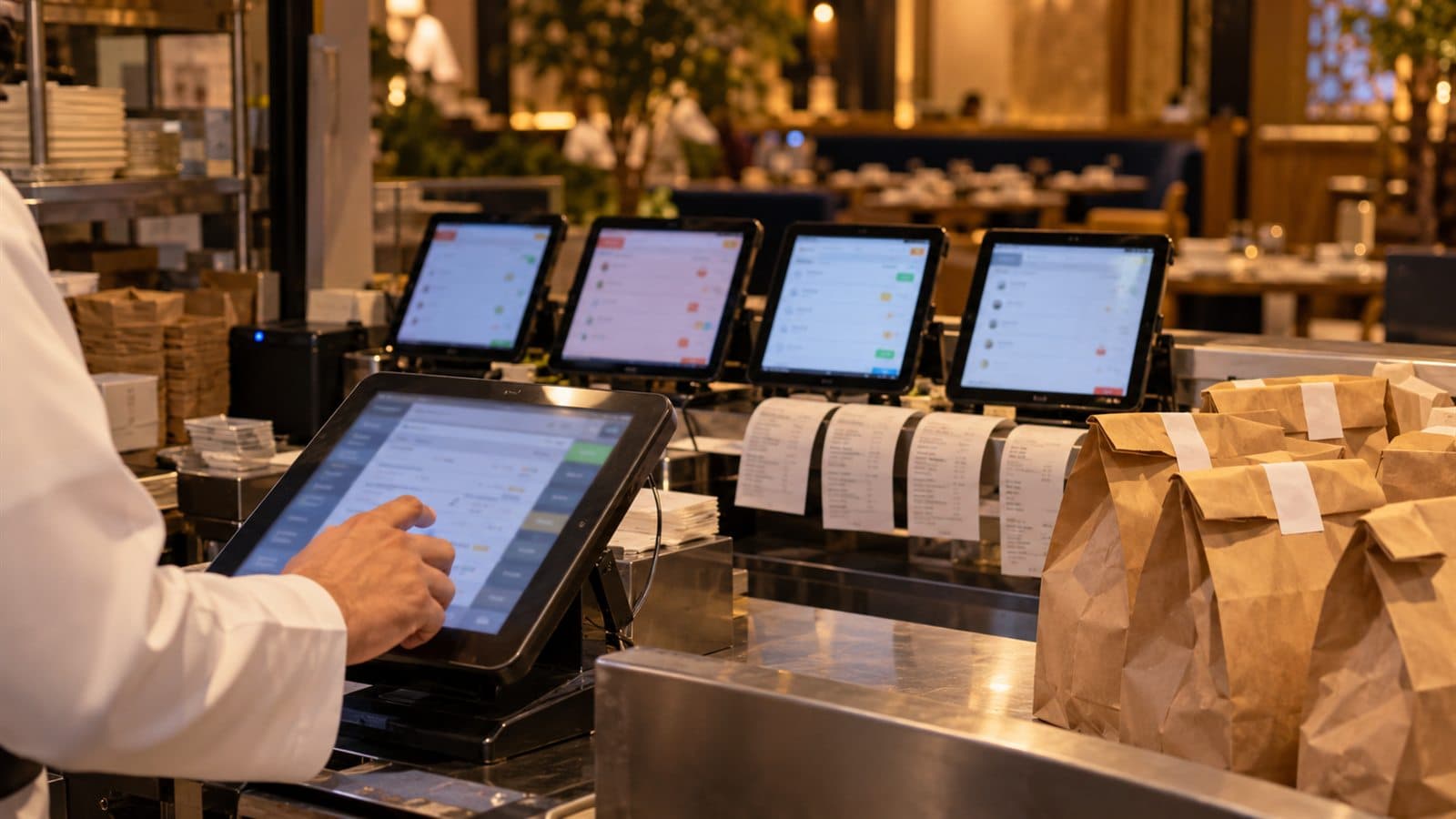
Modifiers get lost between floor and kitchen
No onion, sauce on the side, seat three first. If the ticket does not carry it clearly to the right station, the dish comes back and the table waits twice.
Delivery tablets crowd the counter
Each delivery app arrives on its own tablet, and someone re-types every order into the POS. Orders are missed, prices drift and the kitchen sees two queues.
Peaks expose the slowest step
Iftar in Ramadan, Thursday nights and weekend brunch all hit at once. A POS that pauses for a network call or a slow screen turns into a queue at the door.
Shift close is a spreadsheet
Cash, card, mada and delivery payouts are reconciled by hand after midnight, and branch managers send their numbers in by message the next morning.
Follow one table from seating to the shift report.
A restaurant system is a relay: every handoff should carry the table, the seat, the modifier and the timing to the next person. These screens come from RestoRoots, a restaurant POS and kitchen display system Cicada built.
Open the table with guests, server and any reservation
The host seats the table and the ticket opens with the guest count, the server and any notes carried over from the booking.
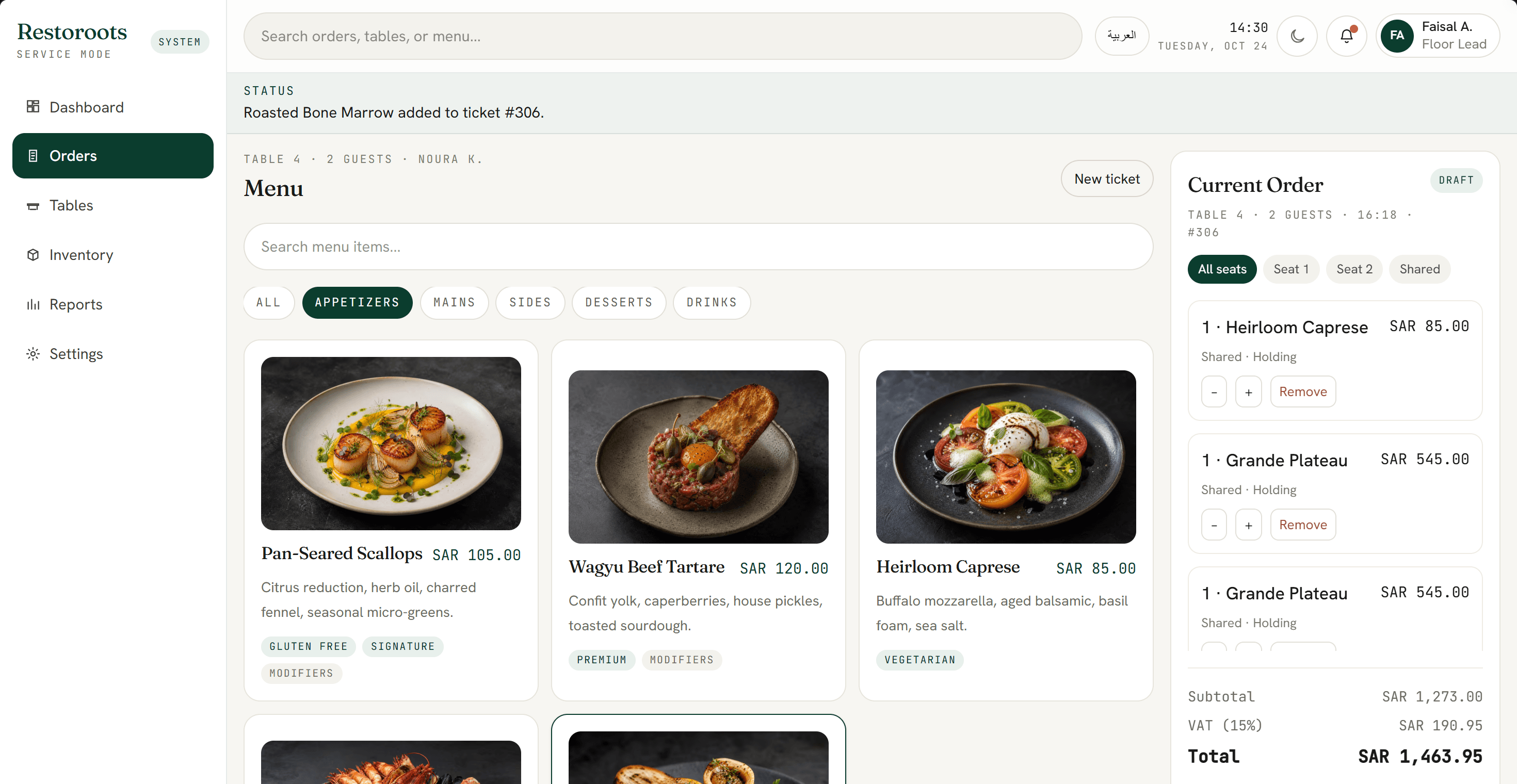
Take the order by seat, with modifiers that cannot be missed
Items go onto the ticket by seat and course, modifiers stay attached to the dish they change, and VAT at 15% is calculated as the order is built.
Route each item to its station with timing
Hot line, cold section, pastry and drinks each receive only their items on a kitchen display, fired by course so plates leave the pass together.
Split by seat or item and issue a compliant invoice
The bill splits however the table asks, tenders go to mada, card or cash, and a compliant simplified invoice is issued at the table or counter.
Give the manager the shift without a spreadsheet
Shift revenue, table turns, live activity and the dining room map stay current, so the manager acts during service instead of reading about it the next day.
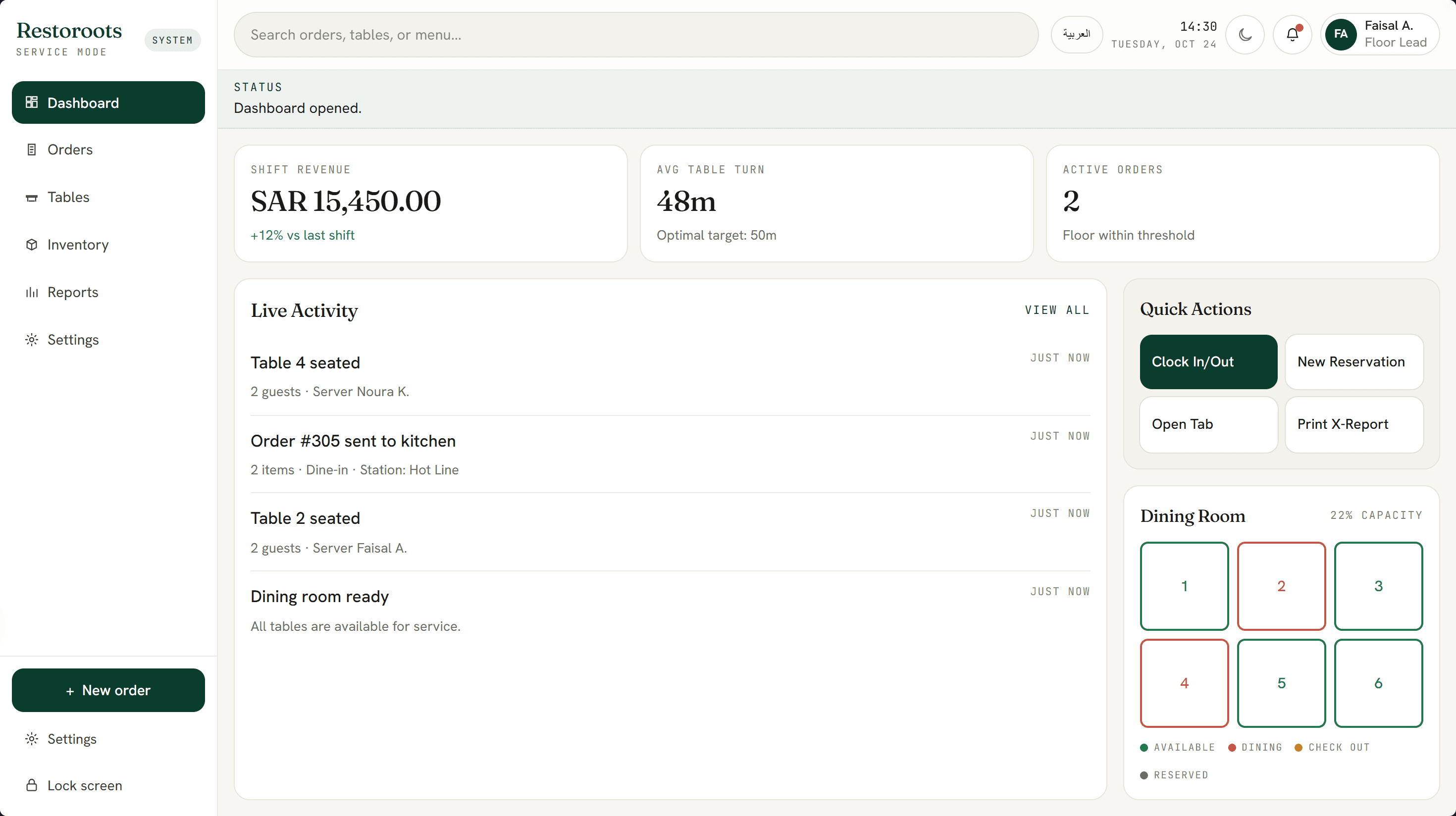
RestoRoots screens are shown with sample data. Your menu, stations, branches and service style shape your own build.
The records and controls the floor and kitchen actually use.
- Table, seat and course ordering
- Modifier-safe tickets
- Kitchen display routing by station
- Delivery app order intake
- Split bills by seat or item
- mada, card and cash tender
- Simplified VAT invoices with QR
- Offline ordering with later sync
- Shift close and cash-up
- Branch and menu performance reports
Different restaurants need different system shapes.
Fine dining
Courses fired in order, guests seated by preference, allergies remembered and a pace that the kitchen controls rather than the printer.
- Course firing and pacing
- Guest preferences and allergies
- Table turn tracking
Quick service and cafés
Counter and takeaway orders, delivery apps, combo rules and an order-ready screen, all built for speed at the counter.
- Combo and modifier rules
- One queue for delivery apps
- Order-ready display
Multi-branch groups and cloud kitchens
One central menu with branch prices, recipes that deduct stock, and group reporting that does not wait for each branch to send its numbers.
- Central menu, branch pricing
- Recipe-based stock deduction
- Group-level daily reporting
Connect the ticket to everything around the restaurant.
Integration planning starts with the rush: what must keep working when a connection drops, and what can safely wait to sync.
The custom system
One record of truth. Each connection has an owner and a failure path.
- 01
Delivery apps
Orders from delivery platforms enter one kitchen queue through the platform's partner API or an approved middleware, where the platform allows it.
- 02
Payment terminals
mada and card terminals from your acquirer, linked so the amount is never typed twice and every tender reconciles.
- 03
ZATCA e-invoicing
Simplified invoices issued at the sale and reported within 24 hours through an integrated, compliant e-invoicing solution.
- 04
Inventory and recipes
Sales deduct ingredients by recipe, so low stock and waste show up before the item runs out mid-service.
- 05
Reservations
Bookings feed the floor plan and the ticket, with guest notes and deposits carried through.
- 06
Accounting
A daily sales journal by branch and tender posted to your accounting system instead of being keyed in.
Evidence from a restaurant system we have built.
RestoRoots shows the discipline a restaurant POS needs: modifier-safe ordering, station routing, a calm front of house and a manager view that is current during service.
Restaurant POS and KDS
RestoRoots
Menu flow, modifiers, table and guest context, send-to-kitchen and manager visibility in one system.
Open proof02Try it yourself
RestoRoots demo
Seat a table, build a ticket and send it to the kitchen with sample data.
Open proof03Sector brief
Hospitality software
How Saudi restaurants and hospitality groups connect floor, kitchen, stock and reporting.
Open proofJudge the system at the rush, not at the demo.
Restaurant value shows up in service speed, fewer remakes, tenders that reconcile and a close that takes minutes. Each should be measured against a baseline taken before launch.
Service speed
Measure how quickly an order reaches the right station and the table.
- Order-to-kitchen time
- Ticket time per station
- Table turn time
Accuracy
Measure whether the kitchen receives what the guest asked for.
- Dishes remade due to ticket errors
- Voids and comps by reason
- Modifier errors raised by the kitchen
Revenue control
Measure whether every sale and tender is accounted for.
- Unreconciled tenders at close
- Delivery orders re-keyed by hand
- Discounts by staff member
Close and reporting
Measure how long it takes to know how the shift went.
- Minutes to close a shift
- Reports prepared by hand
- Branch comparisons available daily
During discovery, Cicada agrees the baseline, target, measurement owner and review window with you. Results depend on adoption, menu complexity and operating decisions; they are not guaranteed.
A custom restaurant POS is not always the right answer.
Most single-site restaurants are well served by a good POS subscription. Custom development earns its place when your service style, kitchen routing, branches or integrations do not fit the product.
| Decision | Restaurant POS subscription | Custom restaurant system |
|---|---|---|
| Service style | Works best for standard counter or table service. | Fits courses, seat-level ordering, live stations and mixed dine-in, takeaway and delivery. |
| Kitchen routing | Printer or display rules from a fixed menu of options. | Routing, timing and course firing designed around your kitchen layout. |
| Delivery and integrations | Limited to the vendor's partner list. | Follows the delivery platforms, terminals, stock and accounting you already use. |
| Ownership and change | Priced per terminal or branch, with the vendor's roadmap. | The client owns the code and IP by default and decides what changes next. |
Answer the expensive questions before the build.
Each page resolves one question restaurant owners and operators ask before they change their POS.
POS requirements for Saudi restaurants
What a POS must do for VAT, ZATCA, payments, kitchen routing and branches.
Open pageRestoRoots interactive demo
Run a table from seating to the kitchen with sample data.
Open pageRestaurant ERP for multi-branch groups
Recipe costing, central kitchen, delivery settlements and branch profit behind the POS.
Open pageZATCA Phase 2 integration
Connect your POS to Fatoora with reporting, offline sync and status checks.
Open pageInventory management systems
Recipe-based stock, transfers between branches and waste tracking.
Open pageZATCA Wave 25 for small businesses
Why cafés and small restaurants now need their till to talk to Fatoora.
Open pageStart at the pass during a real service. Commit in useful stages.
- 01
Service observation
Stand at the pass during a lunch and a dinner service and record every place a ticket slows or breaks.
- 02
Menu and modifier model
Structure the menu, modifiers, courses and stations before any screen is designed.
- 03
One-branch pilot
Run ordering, kitchen display and payments in one branch, through real peaks, before rolling out.
- 04
Invoicing and delivery apps
Add compliant invoicing, terminal links and delivery app intake once the core flow is trusted.
- 05
Branches and reporting
Roll out to further branches with central menu control and group reporting.
Data and access
Staff sign in with their own PIN, voids and discounts need a manager's approval, and every change is logged.
Resilience and hosting
Ordering keeps working during a network drop and syncs afterwards. Guest data is handled in line with PDPL.
Ownership and support
The client owns the custom code and IP by default, with a documented path for support and menu changes.
Built in Riyadh, for floors that get busiest after sunset.
Riyadh hospitality runs late. Dinner service stretches into the night, Ramadan moves the rush to iftar and suhoor, and weekends fill every table. Cicada is based in Riyadh and works with restaurants and hospitality groups across the Kingdom.
Practical answers before the first conversation.
01Will the POS keep working if the internet drops?
Yes, when it is designed for it. Ordering, kitchen routing and payments run locally during a drop, and invoices sync to the e-invoicing solution once the connection returns, inside the 24-hour reporting window.
02Can it take orders from delivery apps?
Usually. Delivery platforms offer partner APIs or approved middleware to some merchants. Discovery confirms what each platform allows for your account before the integration is scoped.
03Does it issue ZATCA-compliant invoices?
The POS issues compliant simplified invoices through an integrated e-invoicing solution that handles the Phase 2 requirements, and shows which invoices were reported and which need attention.
04Which payment terminals can it work with?
mada and card terminals from Saudi acquirers that support integration with a POS. The exact terminal and connection method are confirmed with your bank or acquirer during discovery.
05Can several branches share one menu?
Yes. A central menu controls items, modifiers and recipes, while each branch can carry its own prices, stations and opening hours.
06How long does it take to go live?
Most first releases go live in four to eight weeks after discovery, usually as a pilot in one branch covering ordering, kitchen display and payments.
07Do we own the code and intellectual property?
Yes. Cicada Solutions' default position is that the client owns the code and IP for the custom build, subject to the final agreement and any clearly identified third-party services.
Show us where the ticket breaks between floor and kitchen.
Tell us how many branches and covers you run, how service works today and which tools must stay connected. We will respond with a practical starting point.
- Branches, covers and service style
- Current POS and delivery apps
- Kitchen stations and printers or displays
- Payment terminals and accounting to connect